Query Tuning

Send a SQL Editor query to the AI Assistant and receive rewrite or index suggestions informed by schema metadata and an estimated plan retrieved when needed.

Selecting a target

Use one read-only SELECT statement, including a WITH CTE that ends in SELECT, from the regular SQL Editor.

  • When text is selected, the selected SQL takes priority.
  • When there is no selection, the SQL statement containing the cursor is used.
  • SQL comments are removed before the query is added to AI Chat.
Tip

The entry action does not prevalidate every selected statement. Multiple statements, write SQL, or locking SELECT statements can make estimated-plan lookup fail or produce unreliable advice, so select exactly one target statement.

Verifying database context

Query Tuning uses the Connection and database/schema selected in the active AI Chat session.

Caution:

The Connection from the SQL Editor you right-clicked is not selected in AI Chat automatically. Always verify that the DB shown at the top of AI Chat matches the SQL Editor you are tuning.

Note: If another database is selected or the existing session context is locked, create a new session, select the correct Connection and schema, then start ‘AI: Tune query’ again from the SQL Editor.

How to use

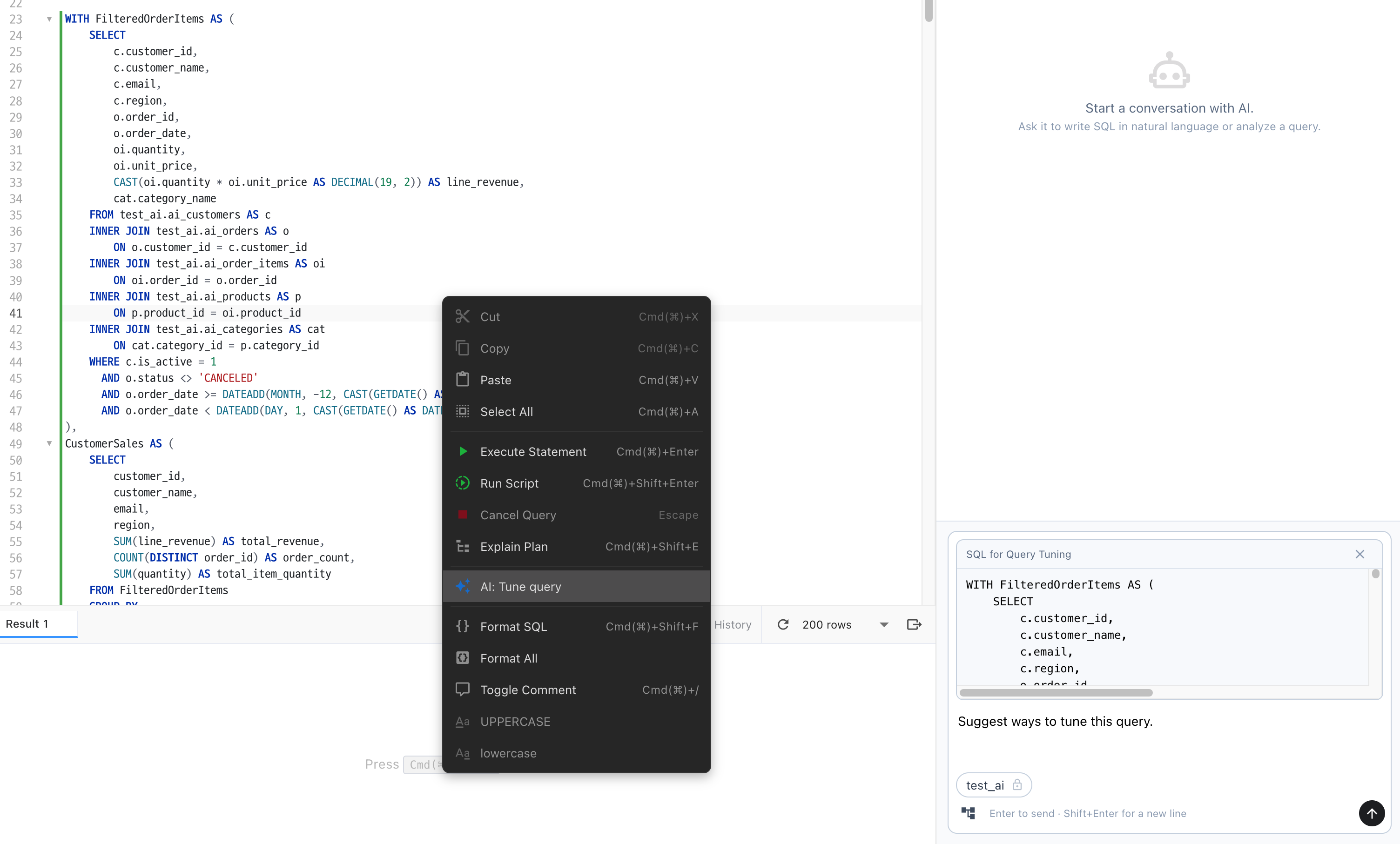
Start Query Tuning from the SQL Editor context menu.

1

Select SQL or place the cursor

Select the SQL you want to tune. If nothing is selected, place the cursor inside the target statement.

2

Select AI: Tune query

Right-click the editor and select ‘AI: Tune query’. AI Chat opens with the target SQL and default tuning instructions.

3

Review the target and instructions

The SQL for Query Tuning block is read-only. Edit the default tuning instruction below it to match your goal.

4

Send and review suggestions

Select Send to start AI analysis. The AI retrieves an estimated plan and metadata when needed. Review the rewritten SQL, index suggestions, assumptions, and caveats together.

Starting AI Query Tuning from the SQL Editor context menu

Reviewing results

Query Tuning does not modify the original SQL Editor automatically and provides evidence and candidates for review. Executable SQL in the answer follows the execution policy.

  • Estimated plans retrieved when needed are supported for MySQL, MariaDB, SQL Server, PostgreSQL, Oracle, and H2. SQLite does not provide an estimated plan.
  • The AI can use a retrieved estimated plan plus relevant columns, keys, indexes, and relationships to suggest rewrites or indexes.
  • Suggested SQL and indexes are not applied to the original SQL Editor automatically. Executable SQL blocks in the answer may run automatically or require confirmation according to the target Connection, database, and schema policy.
  • After one send, the Query Tuning target block is removed. Start again from the SQL Editor to analyze the same SQL another time.

Caution: Executable SQL blocks in the answer follow the execution policy of the target Connection, database, and schema. To review every rewritten statement, the project owner must configure SELECT, DML, and DDL for that schema as ‘Confirm before execution.’

Unverified advisory

An estimated plan cannot guarantee production data distribution or execution time. Verify semantic equivalence and compare actual plans and performance in a test environment before applying a suggestion.