
Parameter Binding
Learn how to auto-detect parameters in SQL and enter values before execution.
Auto Parameter Extraction
Bind variables in :paramName format within SQL are automatically detected at execution time.
Example:
SELECT * FROM users WHERE id = :userId AND status = :status;Executing the above SQL extracts :userId and :status as parameters and shows a value input modal.
Colons inside string literals ('...') or comments (-- ..., /* ... */) are not recognized as parameters.
Parameter Input Modal
When parameters are detected, a modal for entering values is shown before execution.
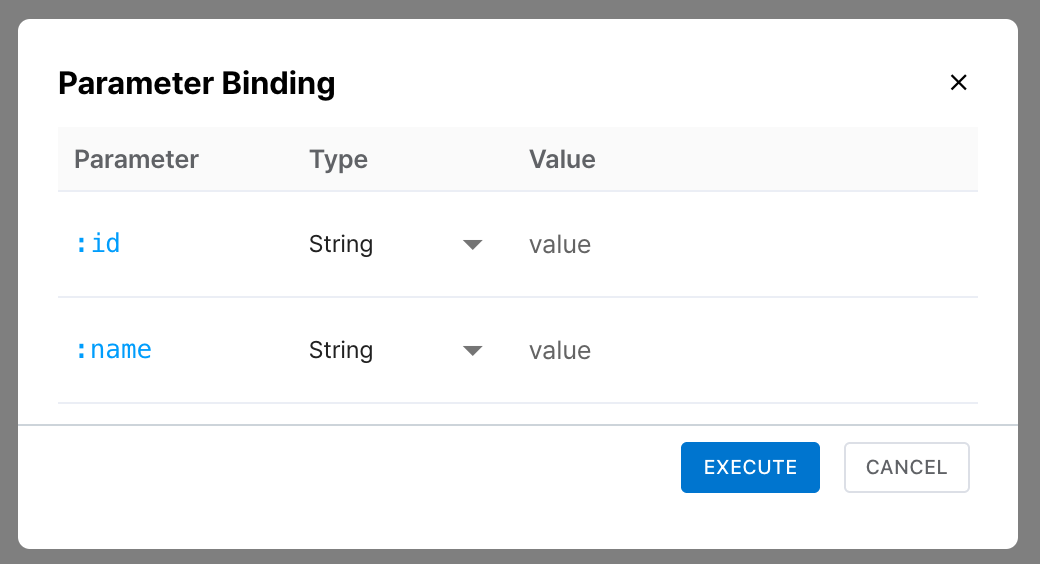
| Item | Description |
|---|---|
| Parameter name | The :paramName extracted from SQL is displayed. |
| Type selection | Choose from String, Number, or NULL. |
| Value input | Enter a value matching the selected type. Selecting NULL disables value input. |
SQL conversion by type:
- String: value is wrapped in single quotes →
'hello' - Number: value is inserted as-is →
42 - NULL: the
NULLkeyword is inserted
Click the Execute button to run the SQL with substituted parameters.
Save & Reuse Previous Values
The parameter input modal remembers previously entered values and types. When re-executing with the same parameter names, previous values are auto-filled for convenient repeated execution.
Useful for repeatedly testing the same query with different values. Previous values are auto-filled, so you only need to modify the parameters you want to change.