
Cloning the current state
Creates new assets from the domain pack and dictionary a connection is using, exactly as they stand, including the changes applied only to that connection. Use it when you want the same standard again in another project or connection.
When to use it
Changes made on a connection stay on that connection only. The source pack is untouched, so using the same standard elsewhere meant assigning the source pack again and repeating every change from scratch.
Cloning takes the combined result — the source pack with this connection's changes applied on top — and writes it into a new domain pack and a new dictionary. Once created, a single assignment gives you the same standard anywhere.
- You have been tweaking an official pack and want to settle that state as your team's standard.
- You want a standard refined on one connection to apply to another project as well.
- You want to keep the current state as it is, separate from whatever you do next.
The source pack is not touched. Cloning creates one more asset, and it leaves the current connection's assignment as it is.
Cloning
Press the clone button in the header of the Data Dictionary panel on the right. If neither a domain pack nor a dictionary is assigned there is nothing to settle, so the button is not shown.
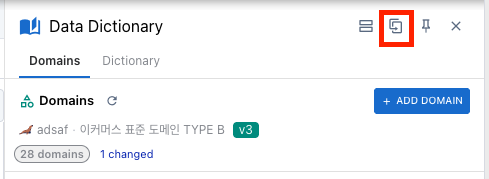
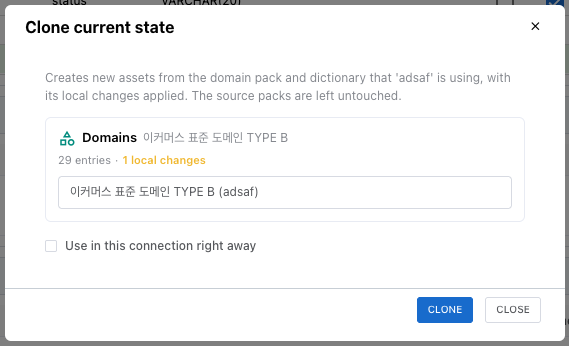
- The source is the connection bound to the tab you are editing, not the one selected in the tree. What you see in the panel is what gets cloned.
- Each assigned slot gets a card showing the source name, the number of entries, and the number of local changes. This is where you confirm what is being settled.
- Clone names are filled in as source name (connection name). Keep them or change them.
- Press Clone to create the copies. They open for editing from the domain pack list and the dictionary list right away.
Entry identifiers are preserved. Later, when you compare against the source or line it up with a newer version of the source, you can still tell which entries correspond.
Use in this connection right away
Turning on Use in this connection right away at the bottom of the dialog switches this connection's assignment to the clone as soon as it is created. The changes you had accumulated are already part of the clone, so the connection's change count starts over at zero.
Left off, the connection keeps its original assignment and changes, and the clone simply appears in your asset list. It is off by default.
Even after switching, edits made in the panel are still changes that apply to this connection only. What changes is the baseline: differences are now shown against the clone rather than the source pack. To edit the clone itself, open it in the domain pack or dictionary editor — unlike an official pack, the clone is your own asset, so you can change it directly.
The domain pack and the dictionary are cloned together
When both slots are assigned, the domain pack and the dictionary are cloned in one action and the cloned dictionary is wired to point at the cloned pack.
If only the dictionary were cloned, it would have to keep pointing at the source pack — but domains you added on the connection do not exist there. Those entries would reference a domain outside the pack, which blocks publishing later. That is why the two cannot be cloned separately.
On a connection that uses a dictionary without a domain pack, only the dictionary is cloned.
Where the clone is created
| Project | Asset created |
|---|---|
| Account project | Created as an account asset and published as its first version straight away |
| Local project | Created as an asset stored on this device (the same whether or not you are signed in) |

Account assets are published immediately because an asset with no published version cannot be assigned to a connection. Without publishing you would end up with a clone you cannot select anywhere.
Check before cloning
Unsaved edits are not included. Only saved changes are settled, and the dialog tells you how many edits are still unsaved. Save them first, then clone.
If you deleted a domain on the connection but entries still reference it, cloning stops and names the entries involved. Reassign their domain in the dictionary panel, or restore the deleted domains, then try again.
This mismatch is not created by cloning — the connection already had it. Left alone it would block publishing the clone for the same reason, so it is caught up front.