
Welcome
NeoSQL is a database development platform that unifies ERD modeling, multi-DBMS schema management, SQL execution, and AI-powered automation in a single tool.
About NeoSQL
NeoSQL brings together every step of database development — ERD design, database connections, SQL execution, schema change tracking, team collaboration, and AI automation — into a single tool. It supports major RDBMSs including MySQL, PostgreSQL, Oracle, and SQL Server, and delivers the same experience in the browser and in the desktop app — and the desktop app works without signing in. It scales from personal side projects to team-wide management of production databases.
Why NeoSQL
There are many ERD tools out there, but NeoSQL closes the loop across AI automation, bi-directional engineering, code generation, multi-environment UX, and operational safety in a single product. Tasks that would normally require installing extra plugins or wiring up separate systems happen seamlessly inside NeoSQL with no additional setup.
Built-in AI Assistant · MCP for External Tools
Use the built-in AI Assistant to generate SQL from natural language and receive Query Tuning suggestions. Connect external AI clients such as Claude Code, Codex, and Gemini through MCP. Control real database operations with the AI Assistant's per-request DB-context allowlist and Connection-level auto-apply and protection policies, plus MCP's separate access scopes.
Bi-directional ERD — Forward · Reverse · Live DDL
Auto-extract an ERD from an existing database (Reverse), and turn ERD changes back into DDL to apply against the real database (Forward). ERD and DB stay synchronized in a single flow, with automatic handling of partial apply, table-name collisions, FK impact from PK changes, and DROP/RENAME impact analysis.
Built-in Code Generation + Template Pack Marketplace NEW
Generate Entities, Repositories, DTOs, services, and full CRUD screens from your table definitions using full Velocity-based templates. Beyond the official template packs, the marketplace offers ready-made packs per language and framework, dramatically shortening the distance from ERD to production code.
Desktop · Web — Same UX
The web browser and the desktop app deliver the same screens, the same shortcuts, and the same feature set. Try things out on the web; do internal-network DB work and team collaboration on the desktop — start without an account and sign in when you need to, so you scale up without switching tools or relearning the product.
Zero-Knowledge Encryption · Connection Privacy · DDL Approval — Production Safety Net
Database credentials are encrypted on the client before being stored, so the server never sees the plaintext. Connection visibility can be limited to owner-only or shared with the team, and SQLite, H2, and localhost connections are automatically marked private. Production DDL can be put behind an approval flow before it runs, reducing the risk of mistakes against live databases.
NeoSQL at a Glance
A quick reference for how far NeoSQL reaches. Detailed capabilities are covered in Key Features and the individual guides below.
- 10 Supported DBMSs — PostgreSQL, Supabase, MySQL, MariaDB, Oracle, SQL Server, SQLite, H2, Databricks, Snowflake — work with ERDs and DDL within each engine’s supported capabilities. Supabase uses PostgreSQL connection settings.
- ERD · SQL · Code Gen · AI in One Workspace — Work continues inside a single workspace, without switching tools.
- From Solo Developer to Team & Enterprise — Permissions are split across four roles — Owner · Manager · DBA · Member — all covered by the same tool.
- Public Gallery — Browse ERDs published by other users, and fork designs you like into your own project to learn from and reuse.
Take a Tour
Take a quick visual tour of the main areas of NeoSQL — from ERD modeling to SQL execution, code generation, and the public gallery.
ERD Canvas
The main workspace where you design tables, columns, and relationships via drag & drop, and tidy up your ERD with auto layout, color, and style options.

SQL Editor & Result Grid
Run queries in a SQL editor with auto-complete and multiple tabs, and review results in a grid or export them as CSV / JSON.
Code Generation Panel NEW
Generate entities, repositories, DTOs, and CRUD screens from your table definitions in one go using Velocity templates.
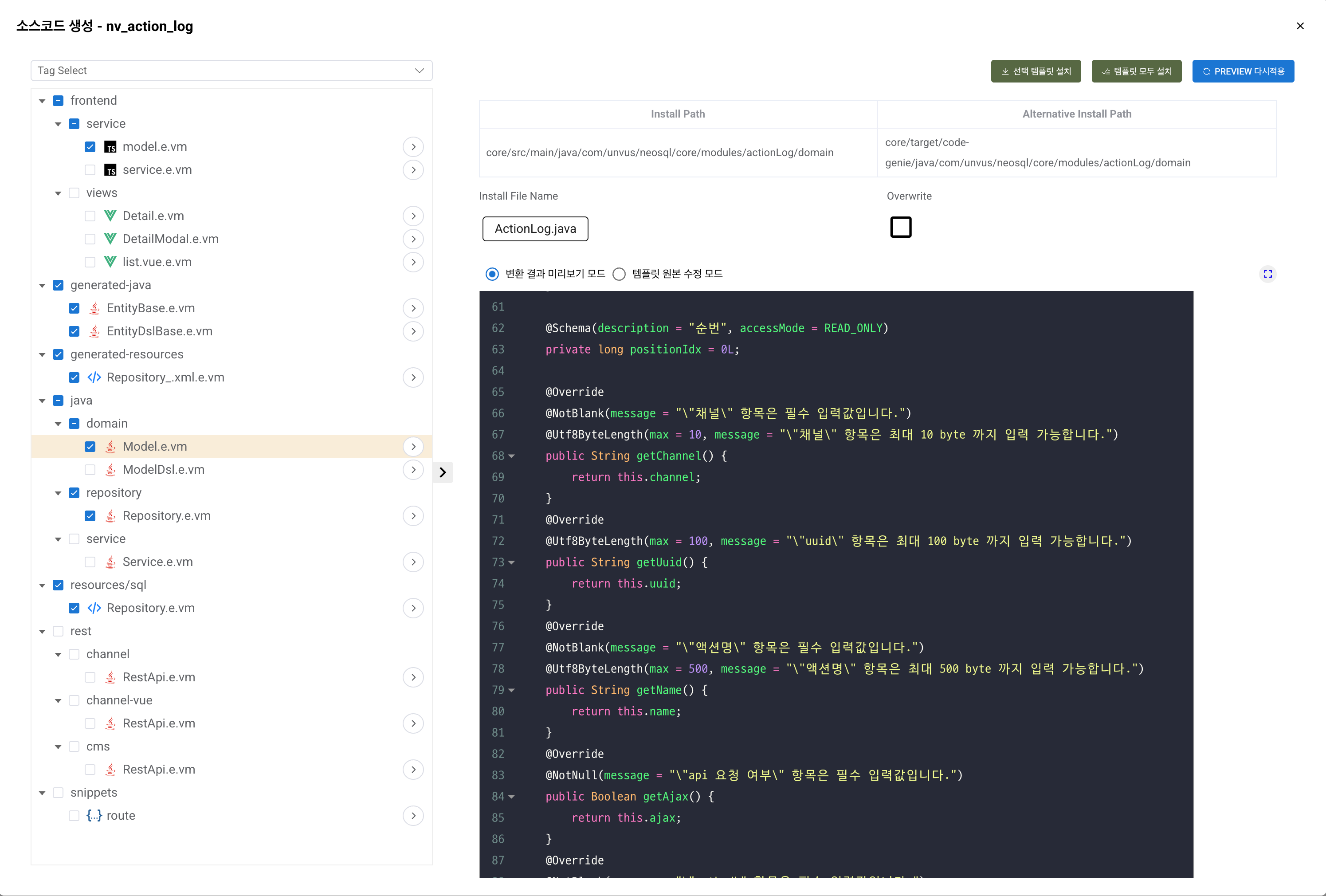
Gallery / Embed Viewer
Browse ERDs published by other users in the public gallery, and embed your own ERDs into external pages for lightweight sharing.
Key Features
Get a quick overview of what NeoSQL offers — from ERD modeling and schema comparison to multi-DBMS dialect conversion and AI automation.
ERD Editor
Design tables, columns, indexes, and constraints with drag & drop, and visualize 1:N, 1:0..N, and N:N relationships. Includes dagre-based auto layout and per-table color and style customization.
Reverse / Forward Engineering
Connect to an existing database to auto-extract tables and relationships into an ERD, or generate DDL from your ERD to apply to a real database. Multi-select lets you sync only the tables you want.
Auto DDL Generation
Track changes in your ERD and automatically generate ALTER / CREATE / DROP statements. Safely handles table-name collisions, FK impact from PK changes, and column type conversions.
Schema Comparison
Compare two database schemas side by side to visualize differences in tables, columns, PKs, FKs, and indexes, then generate sync DDL to apply to the target. Source and Target can be swapped freely, making it useful for diffing dev and production databases.
Multi-DBMS Dialect Conversion
Convert the same ERD into DDL for MySQL, PostgreSQL, Oracle, SQL Server, and more. NeoSQL automatically maps differences in data types, reserved words, and syntax across DBMSs.
ERD Visual Export
Export your ERD as a PNG or SVG image, or copy it to the clipboard for instant use in documents and presentations. Capture either the entire ERD or just the current viewport.
SQL Editor
Write and run queries in the built-in SQL editor and inspect results in a grid. Supports auto-complete, syntax highlighting, multiple tabs, EXPLAIN plans, and transaction control.
AI Assistant · MCP
Use the built-in AI Assistant for natural-language SQL generation and Query Tuning, or connect external AI clients such as Claude Code, Codex, and Gemini through MCP to automate table design, table changes, and SQL execution.
Real-time Team Collaboration
In online mode, cloud-based real-time sync lets your team work on the same ERDs and queries together, with per-project roles and change history.
Security
Database credentials are encrypted on the client before being stored, and connection visibility can be limited to owner-only or shared with the team. SQLite, H2, and localhost connections are automatically marked private.
Supported Databases
NeoSQL supports a wide range of relational databases.
 PostgreSQL
 Supabase
 MySQL
MySQL MariaDB
 Oracle
 SQL Server
 SQLite
 H2
H2 Databricks
 Snowflake
NeoSQL automatically recognizes each DBMS's native data types (MySQL JSON, PostgreSQL ARRAY / JSONB, Oracle NUMBER / CLOB, etc.), sequences, functions, reserved words, and index options, and handles them accordingly. When converting the same ERD to another DBMS, incompatible types are mapped to the closest equivalent.
For environments that require firewall traversal or certificate-based security, NeoSQL supports SSL/TLS connections and SSH tunneling. See the Advanced Connection page in the left menu for detailed setup.
Choose Your Environment
NeoSQL ships as a desktop app and a web app, and the desktop app works without signing in. Pick the environment that matches how you work.
Desktop (Signed Out)
Install and start immediately without signing in. Projects are created as local projects stored only on this PC.
- No sign-up required
- Project data stays local
- Direct internal / local DB access
Desktop (Signed In)
Sign in from the desktop app to add account projects, bringing cloud sync and collaboration alongside local projects.
- Cloud sync
- Team collaboration
- Direct internal / local DB access
Web
Use NeoSQL straight from the browser. No install needed; sign-in is required.
- No installation
- Team collaboration
- Cross-platform
Which One Should You Pick?
The best environment depends on your scenario. Use the guide below to match your workflow.
Just trying it out or want a quick look → Web
Open it in a browser with no install and try ERD modeling and SQL execution right away. Ideal for connecting to public or test databases, or exploring key features with a sample ERD.
Working on production DBs with a team → Desktop (Signed In)
Production databases on an internal network usually only allow access from a developer's PC, so the locally running desktop app connects directly. At the same time, cloud sync shares ERDs and queries with teammates in real time — the most commonly chosen setup.
No account, or data must not leave your machine → Desktop (Signed Out)
Start using it right after install with no sign-up. Projects are created as local projects, so ERDs, table definitions, SQL, and connection settings never leave this PC, and DB passwords are encrypted in the OS secure store. Team collaboration, sharing, and cloud backup require signing in.
To compare features across environments in detail, see the Install & Run page in the left menu. Signing in to the same desktop app simply adds account projects, and using the web app and desktop (signed in) with the same account keeps your ERDs in sync automatically.
Who Is NeoSQL For?
NeoSQL is designed for users across many roles and environments. Pick the scenario that's closest to yours.
Backend developers drawing a new service schema
Ideal when you're designing a new schema from scratch and want to go straight from ERD to DDL and Entity / CRUD code to get the first screens running quickly.
DBAs analyzing and documenting production databases
Ideal for reverse-engineering existing production databases into ERDs to analyze and document them, and managing changes safely through schema comparison and DDL approval flows.
Teams that need real-time collaboration
Ideal for teams who work on ERDs and SQL together in real time, manage per-role permissions and change history, and want to consolidate production-database work into a single tool.
SI / enterprise teams on air-gapped networks
Ideal for finance, government, defense, and other secure environments where project data must not leave the building. Used signed out, the desktop app keeps ERDs, table definitions, SQL, and connection settings entirely on the user's PC.
Users who want to automate DB work with AI
Ideal for users who want built-in natural-language SQL generation and Query Tuning, or who want to connect external AI clients such as Claude Code, Codex, or Gemini through MCP to reduce repetitive database work.
Latest News and How-to Guides
Release updates, tips, and in-depth technical guides are published on the NeoSQL blog.