
Query period (:from · :to)
How the period picked in the toolbar reaches tile queries, and which timezone those values are sent in.
Using the period parameters
Put :from and :to in a tile query and the value picked in [Period] on the toolbar is bound. These are the only names accepted; with any other name the tile is not saved.
Example:
SELECT DATE(created_at) AS d, COUNT(*) AS cnt FROM orders WHERE created_at >= :from AND created_at < :to GROUP BY DATE(created_at) ORDER BY dThe presets are Last hour, Last 24 hours, Last 7 days, Last 30 days and Custom (a date range). Presets are computed at run time, so ‘Last 24 hours’ does not stay stuck on yesterday’s window when the date changes while the dashboard is left open.
A tile that does not reference the period does not re-run when the period changes. The toolbar shows how many tiles do reference it, as ‘n using period’.
Values are bound as parameters, not substituted as strings — date literal syntax differs per DBMS, and string substitution opens an injection hole.
:to is midnight of the next day
Picking 9/1 – 9/30 as a custom range binds 10/1 00:00 to :to. So the window has to be written as >= :from AND < :to for every day you picked to be included.
Sending 00:00 of the last day would drop that whole day and leave 29 days of data, and closing at 23:59:59 makes that one second and its milliseconds ambiguous at the boundary.
BETWEEN :from AND :to includes both ends, so it picks up one extra row at the last day’s midnight. A half-open range (>= and <) is recommended.
Which timezone is sent
By default it is the wall clock of that connection’s DB timezone (for example 2026-09-01 00:00:00).
A DATETIME or TIMESTAMP column holds digits only, and whether they mean UTC or local time is recorded nowhere in the schema. Such columns are usually filled by NOW() or SYSDATE, so the timezone in which the server says ‘now’ is what those digits are relative to.
If the viewer’s timezone were the default, teammates in different timezones opening the same dashboard would query different windows. The basis depends on the data, not on who is looking.
The DB timezone is asked of the server when you press Test Connection, and it is stored on the connection. It is a fact the server answers rather than a setting you choose, so it does not appear in the connection settings screen.
For a connection that has never been tested the basis is unknown, so UTC is sent and the screen says ‘UTC · DB timezone unknown’. Pressing Test Connection once in the connection settings fills it in.
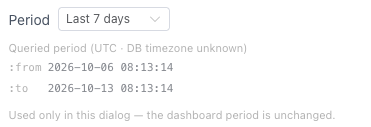
A wrong basis queries a window shifted by the offset, with no error — the counts are just slightly different, so nothing shows up as a symptom. That is why the basis actually used is always written on screen.
Query in my timezone
Turning on [Query in my timezone] under the query in the tile settings sends your timezone’s wall clock instead of the DB timezone, for that tile only. The checkbox appears only when the query uses :from and :to.
The price is a different window for each viewer. Teammates in another timezone see different values from the same tile.
- Below the period picker in the tile settings, Queried period (timezone) and the
:fromand:tovalues actually bound are written out. You can watch them change as you turn the checkbox on and off. - On the dashboard a clock icon appears in that tile’s footer, and hovering it shows the same values. It is not added to tiles running on the default basis (the DB timezone) — a marker is only worth something when it says ‘this tile is different’.
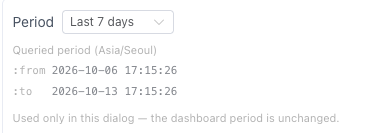
Query basis and display basis
Which basis the query is sent in, and how the returned value is displayed, are two different axes.
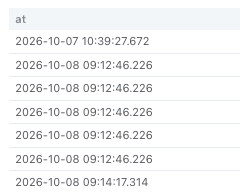
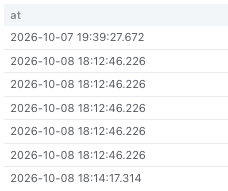
| Setting | What it changes |
|---|---|
| Query in my timezone | The value sent as :from and :to. The queried window itself changes. |
| Show in my timezone | How the returned value is displayed. Zone-less columns are read in the DB timezone and drawn in yours. The queried window is unchanged. |
Columns that carry an offset (TIMESTAMPTZ and the like) identify an exact instant, so they are always converted to your timezone regardless of this setting.
Columns holding only a date or only a time do not point at any instant, so they are not shifted — shifting would make 2026-09-01 (DATE) read as the previous day for a user in a western timezone.
Date-only columns and times stored as text still need converting in the query (CAST, TO_CHAR). For a table where the server timezone and the value the application writes disagree, converting in the query is the only option (for example CONVERT_TZ(:from, 'Asia/Seoul', 'UTC')).