
Canvas Basics
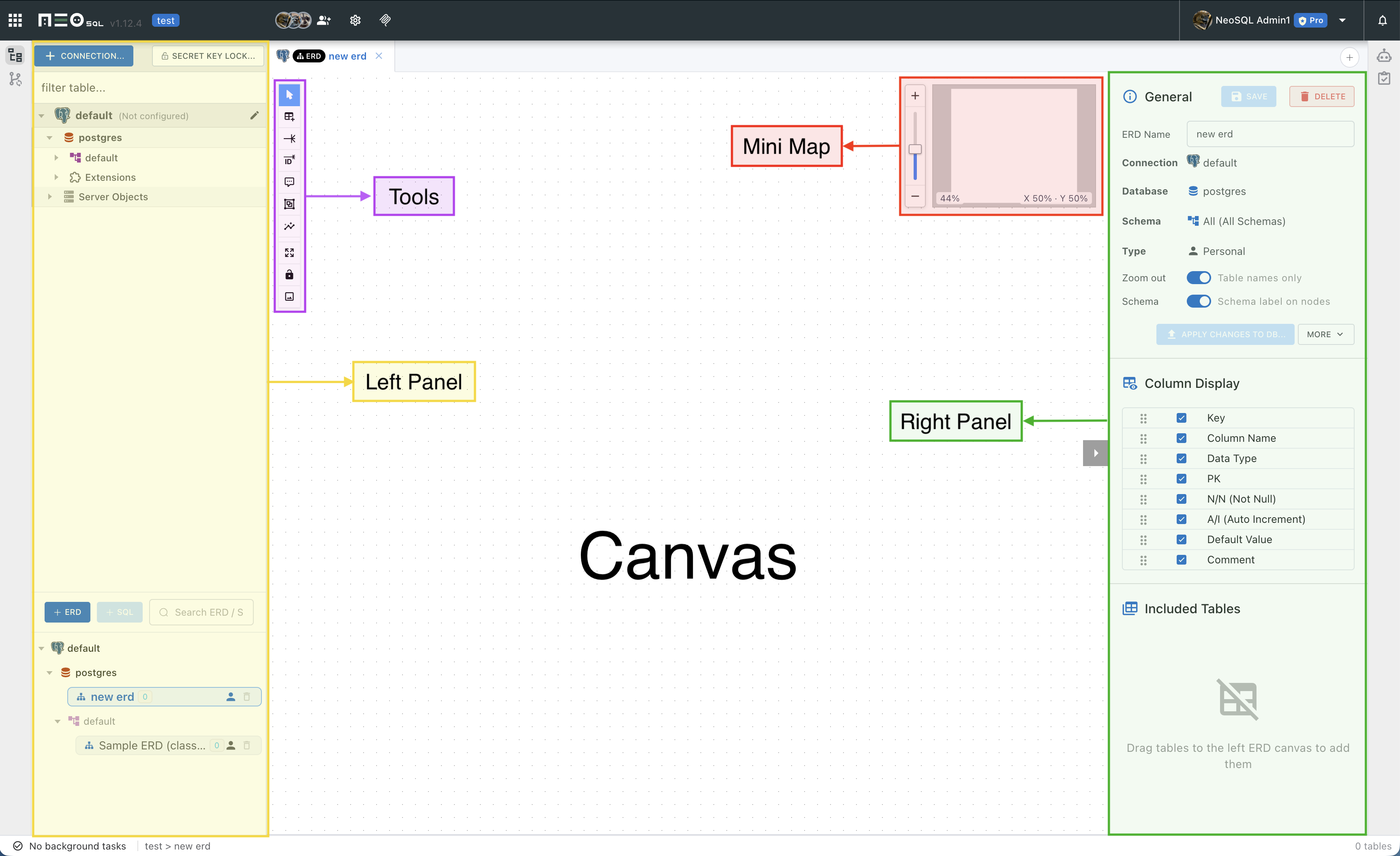
The ERD canvas is the main workspace for placing tables and connecting relationships. Switch between select, pan, add, relationship, memo, and group modes as you work.
Basic Screen
Table nodes are placed in the center of the canvas, and work mode buttons are stacked vertically in the left toolbar. The minimap in the upper right shows your current position in large ERDs, and the zoom slider next to it controls zoom in/out.
Work Modes
You can change the current mode from the left toolbar or the canvas right-click menu. In relationship modes, the cursor and node handles change so you can see which type of connection you are creating.
| Mode | Action |
|---|---|
| Select / Move | Select tables, memos, and groups, then adjust their positions. |
| Pan | Drag the canvas with the hand tool to move the view. In this mode a drag always pans, so you can start it on top of a table. It stays available while locked. |
| Add new table | Click the canvas to create a new table node. This is unavailable while locked. |
| Non-identifying relationship | Connect a parent table and child table to create a regular FK relationship. |
| Identifying relationship | Create a relationship where the parent key is part of the child table identifier. |
| Memo | Add an explanatory memo to the canvas. |
| Group | Drag to draw an area and group multiple tables by business unit. |
Context Menu
Right-click an empty canvas area to show mode switching, paste table, auto-layout, image export, and DDL Import menus. Right-click a table to show detail view, save, restore, apply to DB, pull schema again, copy/cut, and column action menus.
Copy, Cut, and Paste
Tables and columns can be copied or cut from the context menu and pasted into the current ERD. If you copy multiple selected tables, the selected group is brought together. During paste, table names, FK names, index names, and constraint names are automatically adjusted when they conflict.
| Target | Action |
|---|---|
| Table | Copies the table structure and ERD placement. Pasting into the same ERD creates it with a non-conflicting name. |
| Column | Pastes selected columns into another table. If a column name already exists, it is adjusted to a new name. |
| Scope | Copied items can only be pasted into ERDs with the same Connection and Schema scope. |